- DATE:
- AUTHOR:
- The Scribe team
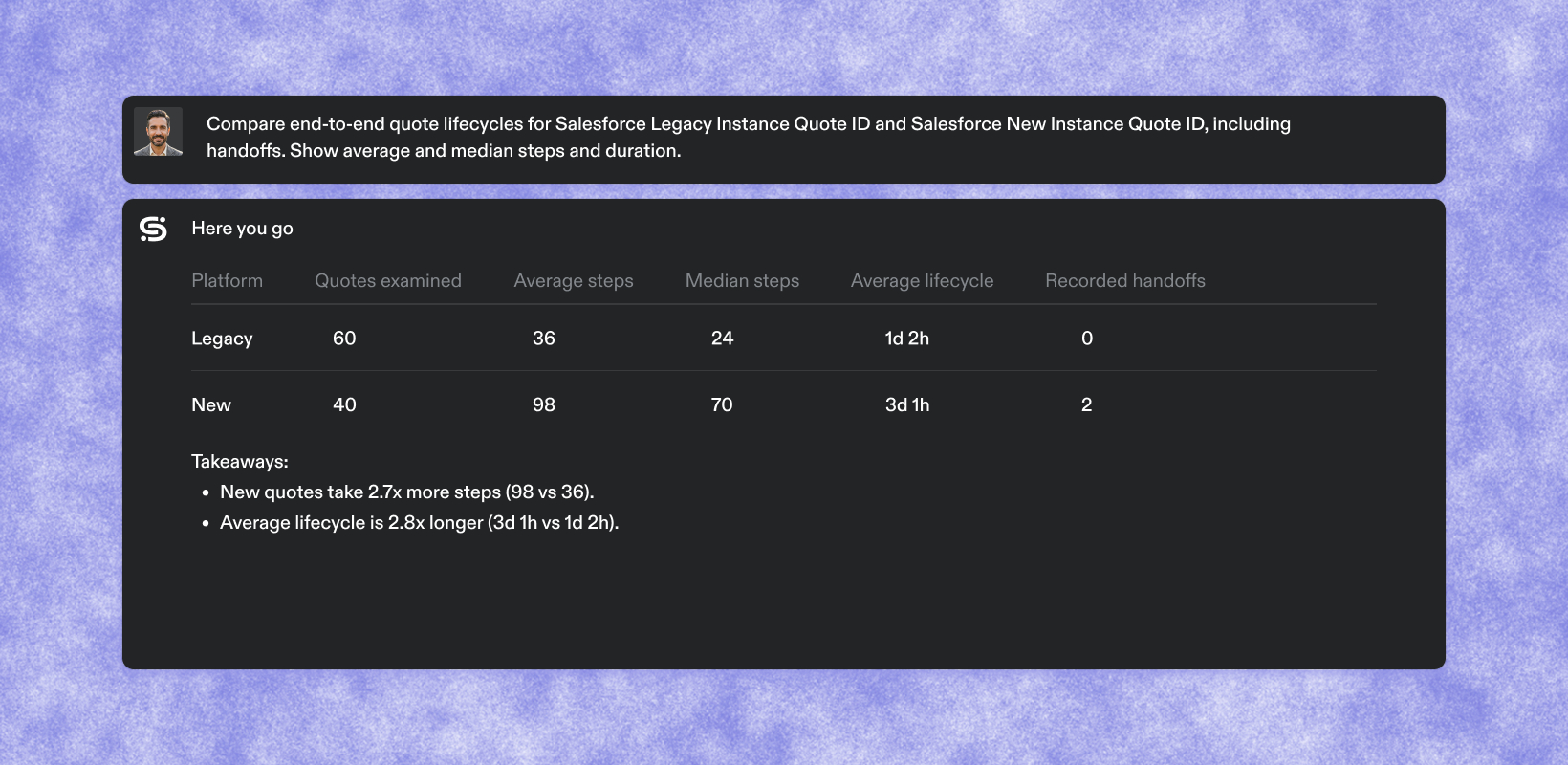
Measure cycle time for every ticket, deal, and case
What's new
Optimize now links every session that touched the same ticket, deal, or case into a single timeline. Add a Case ID rule that picks the ID out of the page URLs your team visits, and Optimize tags the matching work and pulls it together.
For each case, the agent can report cycle time, active time versus time spent waiting between people, handoffs, and the people and apps involved. Looked at across many cases, those numbers show where work really stalls and which workflows to fix first.
Case IDs are live for all Optimize customers.
How it works
Start with suggestions. In Settings → Case ID rules, the Suggested tab lists IDs Optimize has already found in your workspace’s recent activity, such as a Zendesk ticket number or Salesforce Opportunity ID. Review one and add it as a rule. If you know your ID format, you can write your own rule.
See results in minutes. A new rule scans the last 7 days of activity, with counts showing within a few minutes. From then on, it tags new work as it comes in.
Measure time per case. See cycle time, active versus waiting time, handoffs, and who and what was involved, for a single case or across all of them.
Ask the agent. The agent can list the case types you track, rank cases, and walk you through any one case step by step. Anyone with Optimize dashboard access can ask.
Use it through MCP. The same case data is available through the Scribe MCP.
Works with the tools you use. Salesforce, Zendesk, Jira, and ServiceNow all put IDs in the URL, so they work today, along with many other tools.
FAQs
Q. Who can set up Case ID rules?
A. Optimize system admins manage rules. Anyone with Optimize dashboard access can ask the agent about cases.
Q. Do I need to turn anything on?
A. Nothing is tracked until a rule is added. An admin can open the Suggested tab in Settings → Case ID rules, review a suggestion, and add it as a rule.
Q. How far back does it look?
A. A new rule scans the last 7 days of activity, then tags new work going forward.
Q. Does this change what Scribe captures?
A. No. Case IDs are read from URLs that are already captured, so rules only change how that activity is grouped. No migration is needed.
Q. What if I delete a rule?
A. The case IDs that rule found are removed. Your workflows and instances stay untouched.
Q. What are the limitations today?
A. The ID has to appear in the page URL. IDs that only show on screen or inside an embedded frame aren’t picked up yet, and desktop apps like Word and Excel aren’t supported. Handoffs by email, Slack, or Zoom aren’t captured. Numeric-only IDs that Optimize redacts aren’t captured either.
Q. Are all suggested rules useful?
A. Not always. Some suggestions are noise, so have someone review them before adding.
Q. Does it cost extra?
A. No, Case IDs are included with Optimize.