- DATE:
- AUTHOR:
- The Scribe team
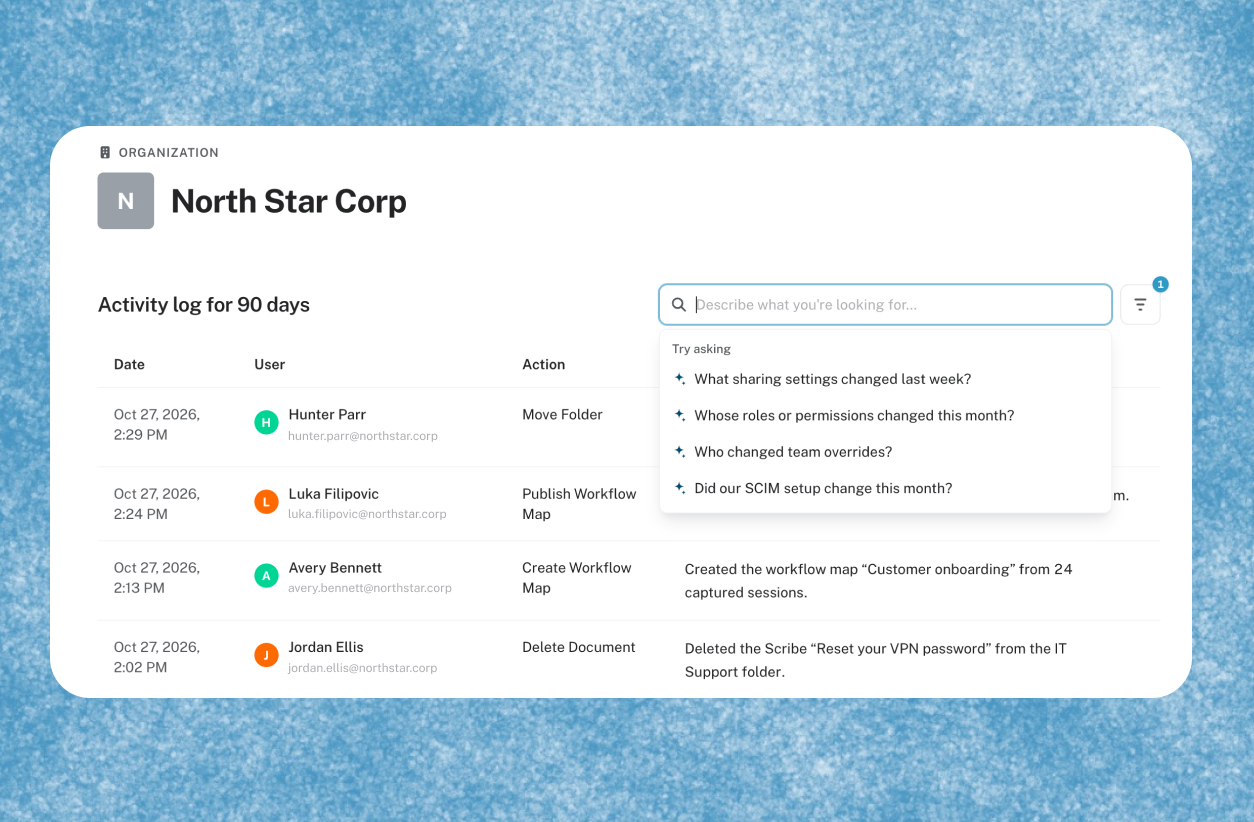
Know what changed, by whom, and when across your Scribe system settings
What’s new:
Admins can now use AI-powered search in the Activity Log to find any settings change without scrolling. Search in your own words, like “who moved the new hire onboarding folder for the Finance team?”, and Scribe applies the right filters for you. Understand who made the change and when with a quick scannable summary of each activity. For security, IT, and compliance teams, there is also a new Activity Log API endpoint, so you can pull your logs into your own tools on your own schedule.
How does it work?
Ask in your own words. Type a question into the Activity Log search, like “when was eliza.smith@northstar.corp's role changed?” Scribe finds the matching events and applies the filters for you.
Narrow it down yourself. Filter by date, user, team, or event category. System Admins can drill into a single team without opening each one.
Pull logs into your own tools. Use the Activity Log API endpoint to retrieve the full 90 days of logs, page by page, on whatever schedule you choose. Centralize them in your own systems and watch for the events that matter to you.
FAQ:
Q. Who can use the Activity Log?
A. Admins on Pro and Enterprise plans. System Admins see the org-level log, and team admins see their own team’s log.
Q. What kinds of questions can I ask?
A. Anything about who changed what, and when. For example, “who disabled workflow mapping?” or “when was this person’s role changed?” Search applies the matching filters, and you can adjust them afterward.
Q. How far back can I see events?
A. The last 90 days in the product and through the API. For older logs, contact support, who can provide up to one year on request.
Q. Who can use the API endpoint?
A. Customers with API access. Find the documentation in the Developer Access tab in Organization settings.